You have a Properties table and a Contacts table.
In Properties, you create a Property Manager field linked to Contacts.
Then you create another linked field called Electrician, also pointing to Contacts. Later, you add another for Cleaner.
When you open the Contacts table, Airtable has added several linked record fields automatically.
It can look like Airtable is creating duplicate fields, but each one represents a different relationship between Properties and Contacts.
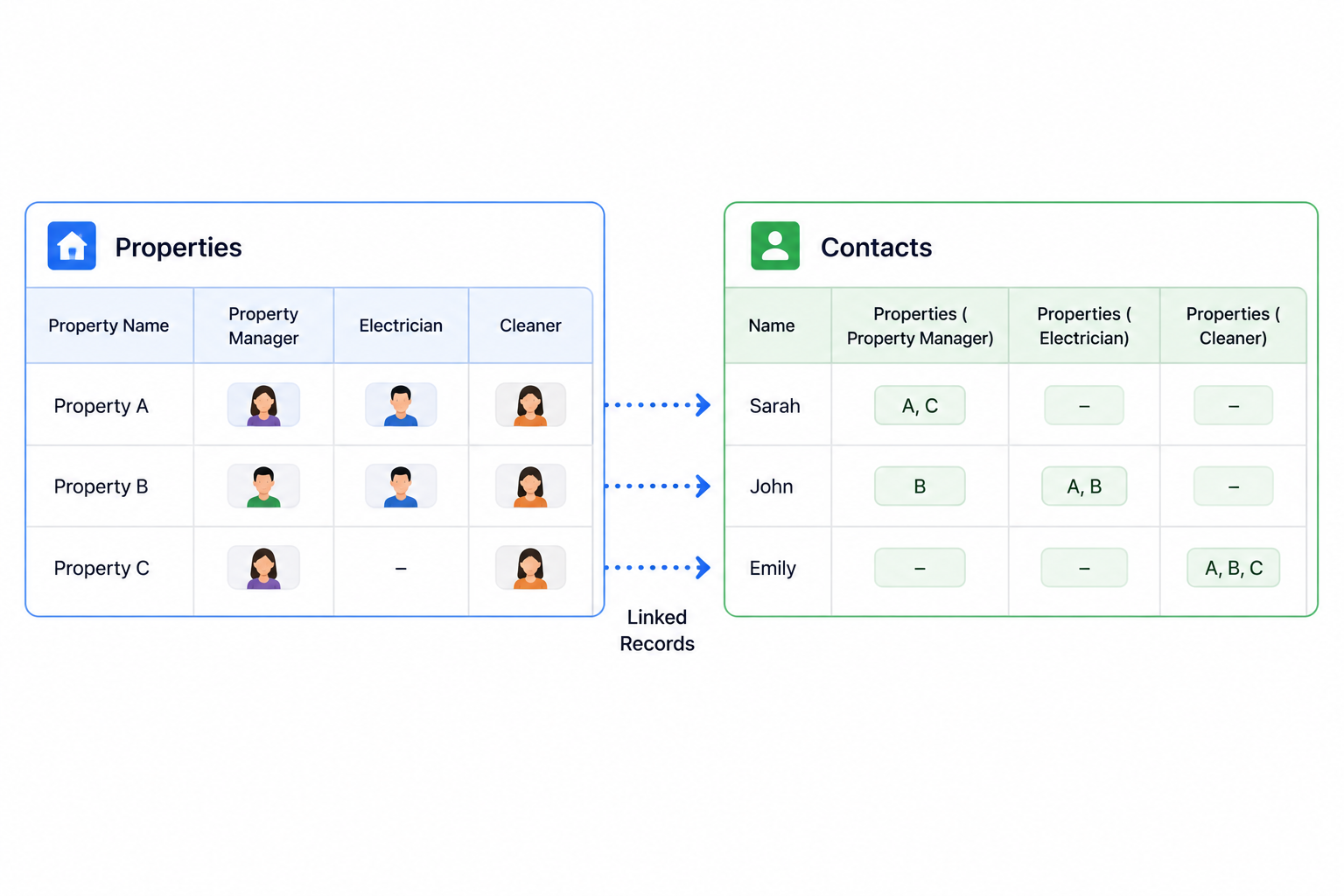
Linked records work in both directions
When you create a linked record field between two tables, Airtable creates the relationship in both directions.
If Property A has Sarah selected as its Property Manager, Sarah's record in Contacts also needs to know that she is the Property Manager for Property A.
Airtable handles this by automatically creating a corresponding linked record field in the Contacts table.
So the relationship works like this:
Properties                    Contacts

Property Manager  ←────────→  Properties - Property Manager
Changing the link from either side updates the relationship on the other side.
Why you get multiple fields
Now consider what happens when Properties has three different links to Contacts:
Property Manager → Contacts
Electrician      → Contacts
Cleaner          → Contacts
These are not three copies of the same relationship.
A contact can be the Property Manager for one property, the Electrician for another, and the Cleaner for another.
Airtable therefore needs to keep those relationships separate.
That's why the Contacts table gets a corresponding field for each one.
For example, Sarah's contact record could show that she manages Properties A and B, while John's record shows that he is the Electrician for Properties B and C.
Combining those into one generic Properties field would lose the information about what each person does for the property.
Don't delete the extra linked fields
If you don't need to see these fields in your normal Contacts view, hide them instead of deleting them.
The fields are part of the linked-record relationships between your tables.
Deleting one of the linked fields removes that relationship rather than simply removing an unnecessary display field.
You can hide the fields from your views while keeping the relationships intact.
Rename them so their purpose is clear
The easiest way to manage multiple relationships is to give the reciprocal fields clear names.
In the Contacts table, I would use names such as Properties - Property Manager, Properties - Electrician, and Properties - Cleaner.
Now when you open a Contact record, it's immediately clear why there are several Properties fields.
This becomes especially important as your base grows and you create more relationships between the same tables.
Use the reciprocal fields for lookups and rollups
These automatically created fields are also useful when you want to bring related information into the Contacts table.
For example, you could use the Properties - Property Manager link to create a lookup showing the addresses of all properties that person manages.
Or you could count how many properties they manage.
The same can be done separately for the Electrician and Cleaner relationships.
So these extra fields aren't duplicate fields that Airtable randomly creates. Each one represents a separate relationship between your records.
If you don't need to see them, hide them. If you do use them, rename them so the relationship is immediately obvious.