You have job reports in Airtable, and every report belongs to a project.
For each project, you want the reports numbered separately:
Project A: Report 1, Report 2, Report 3 Project B: Report 1, Report 2, Report 3
Airtable's Autonumber field won't do this because its numbering applies across the entire table. It doesn't restart at 1 for each project.
One workaround is to use your Projects table to collect the IDs of its reports and then calculate where each report appears in that list.
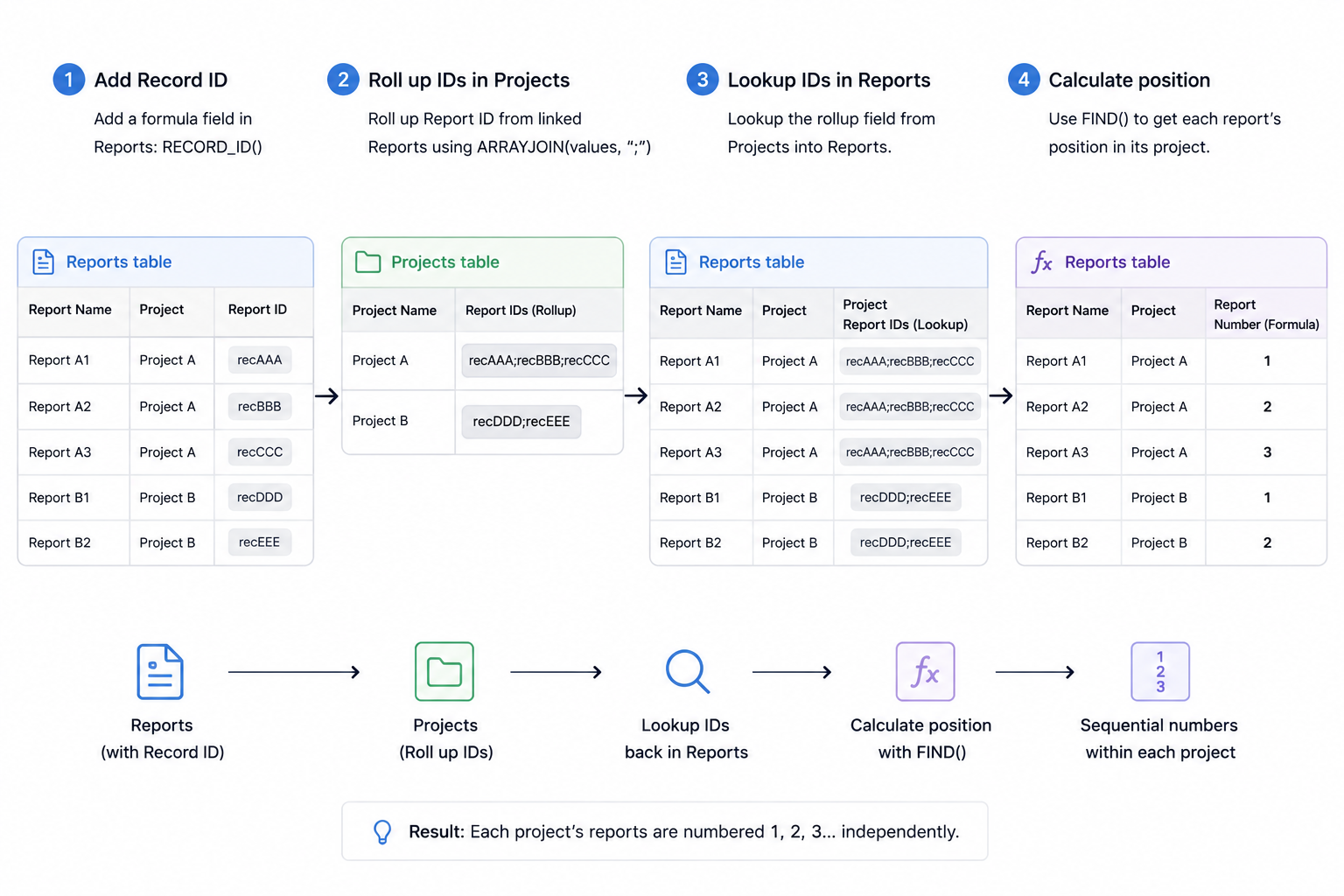
Set up Projects and Reports
You need two tables:
Projects One record for each project.
Reports One record for each job report, with a linked record field connecting it to the appropriate project.
That Project link is what allows us to calculate the sequence separately for each project.
Add the record ID to Reports
In the Reports table, create a Formula field called Report ID.
Use:
RECORD_ID()
Every Airtable record has its own unique record ID.
We'll use this ID to identify where each report appears in its project's list of reports.
Roll up the report IDs for each project
Go to the Projects table.
Because Reports are linked to Projects, Airtable automatically gives you the reciprocal link containing all the reports belonging to each project.
Create a Rollup field called Report IDs.
Roll up the Report ID field from the linked Reports and use:
ARRAYJOIN(values, ";")
A project with three reports will now have a value containing the three report IDs:
recAAA;recBBB;recCCC
Bring the list back to each report
Return to the Reports table.
Create a Lookup field using the Project link and bring in the Report IDs field from Projects.
Call it Project Report IDs.
Every report can now see the complete list of report IDs belonging to its project.
For example, all three reports belonging to Project A might see:
recAAA;recBBB;recCCC
Calculate the report's position
Now create a Formula field called Report Number.
Use:
1 + (FIND({Report ID}, {Project Report IDs}) - 1) / (LEN({Report ID}) + 1)
Here's what it does.
FIND() returns the position where the current Report ID starts inside the complete list.
Because every record ID has the same length and we're separating them with one character, we can convert that position into:
1, 2, 3, 4...
The sequence starts again for every project because each project has its own list of Report IDs.
So you end up with:
Project A
- Report 1
- Report 2
- Report 3
Project B
- Report 1
- Report 2
- Report 3
One thing to know about the order
The sequence is based on the order of the linked Reports for each Project.
Normally, newly linked records are added to the end of the linked-record list, which works well if you want reports numbered in the order they are added.
However, Airtable allows linked records to be reordered. Removing and re-adding a linked record can also move it to the end of the list.
So I would use this approach when you need a simple sequence within each project and the linked-record order won't regularly be changed.
If the report number needs to be a permanent identifier that can never change, I would use an automation or script to assign the next number to a normal Number field instead.