Send Images from Airtable to Slack Without Manual Uploads
You’ve got an order coming into Airtable. The customer’s name, the quantities, and an image of what they ordered.
You set up an automation in Airtable so that as soon as the order comes in, a Slack message is sent. The Slack message contains the order details and the image.
The customer name and quantity show up in Slack just fine.
But Slack doesn’t display the actual image. It only shows the link.
So now, someone on your team has to click that link, download the image, and manually upload it into Slack.
That’s an extra step. And when you’re dealing with order after order, those extra steps pile up.
And there’s another problem. Airtable attachment URLs are temporary. They expire after a couple of hours.
So if someone tries to open the link in Slack later, the image won’t load at all. They can’t view it, they can’t download it, and they can’t reupload it into Slack even if they want to.
That breaks the workflow completely.
You want a way for the automation itself to send the actual image as an attachment in Slack.
How do you actually do this in Airtable?
Unfortunately, it is not possible to use Airtable’s automations to upload images to Slack, because Airtable’s automations don’t support that particular Slack feature.
If you want the image to show up inside Slack, you need to use third party automation tool such as Make.
The setup in Make works like this.
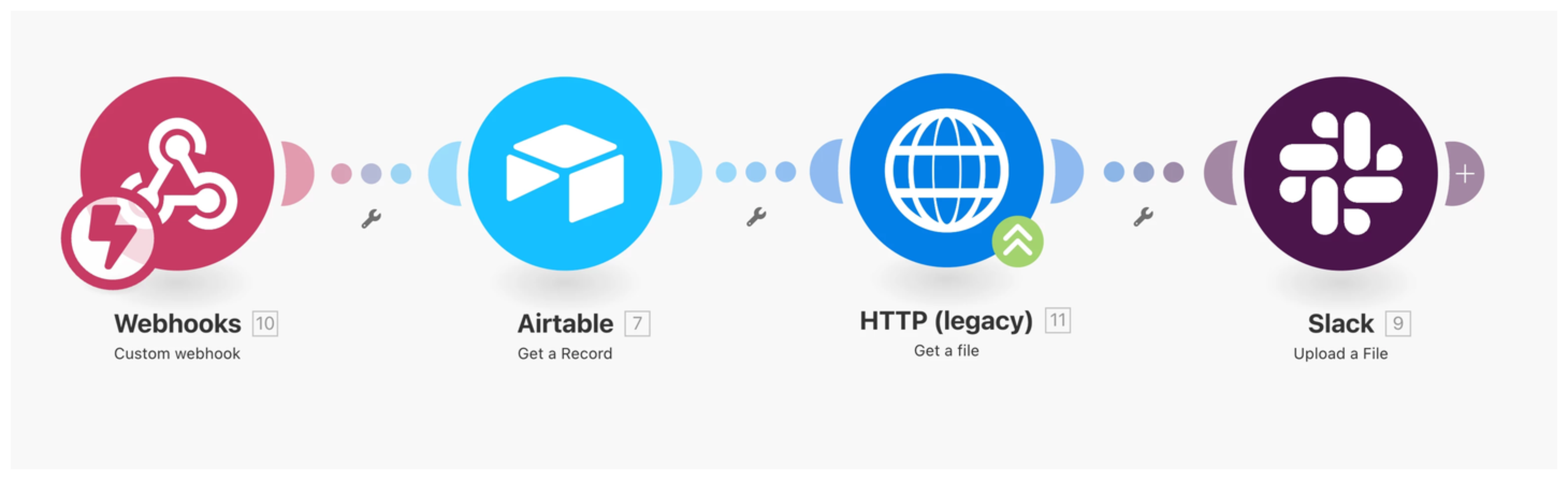
The tool watches Airtable for new or updated records. If a new order is created or if the image on an existing order is updated, the automation triggers immediately.
When that happens, it pulls the order details along with the attachment URL from Airtable. It then fetches the actual image file from that URL and prepares it for delivery.
After that, it uses Slack’s file upload feature to post the image directly into your channel, along with the message that includes the customer name, quantities, and any other order information.
Everything arrives in Slack already attached, so your team doesn’t have to click links, download anything, or upload files manually.