Do Read-Only Users Need a Paid Airtable License?
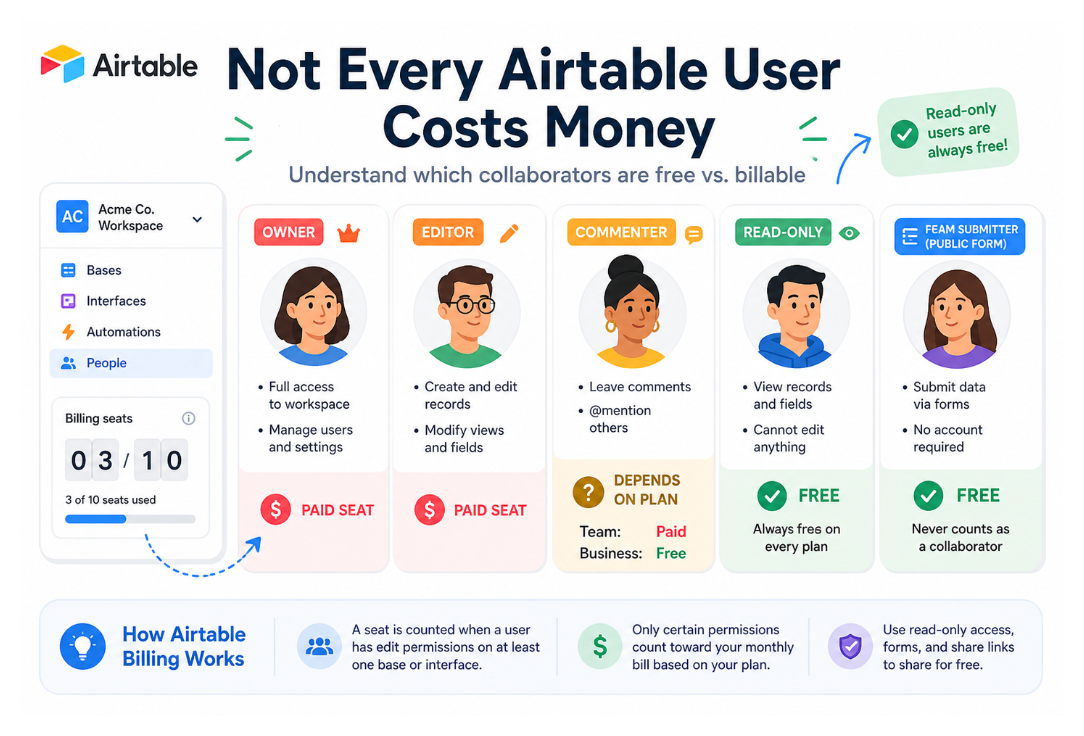
Short answer: no. Read-only collaborators do not require a paid seat on any Airtable plan. You can add unlimited read-only users to a workspace at no extra cost, whether you are on the Free, Team, Business, or Enterprise Scale plan.
But there is an important nuance that catches a lot of teams off guard, specifically around Commenter access.
How Airtable Billing Actually Works
Airtable charges per seat, per workspace. A seat is counted when a collaborator has edit permissions on at least one base in the workspace.
Here is the full breakdown by permission level:
On the Team Plan ($20-24/user/month)
| Permission | Billable? |
|---|---|
| Owner | Yes |
| Creator | Yes |
| Editor | Yes |
| Commenter | Yes - billable on Team |
| Read-only | No - free |
This is the one that surprises people. On the Team plan, Commenters are billable. If you add someone as a Commenter so they can leave notes on records, they count as a paid seat.
On the Business Plan ($45-54/user/month)
| Permission | Billable? |
|---|---|
| Owner | Yes |
| Creator | Yes |
| Editor | Yes |
| Commenter | No - free on Business |
| Read-only | No - free |
On Business, Commenters are not billable. Only Owners, Creators, and Editors count toward your bill.
On the Free Plan
The Free plan includes up to 5 collaborators with Owner, Creator, or Editor permissions, and up to 50 users with Commenter permissions. Read-only collaborators are unlimited.
What Read-Only Users Can and Cannot Do
Read-only access is more capable than the name suggests. Here is what someone on read-only access can actually do:
They can:
-
View all records in any table they have access to
-
See all fields, including attachment fields
-
Filter and sort views for their own session (without saving)
-
Click on links in URL fields
-
View any interface they have been given access to
They cannot:
-
Edit, create, or delete records
-
Change field types or configurations
-
Create or modify views
-
Run automations
-
Access the base's structure or settings
Read-only is ideal for stakeholders, clients, executives, and anyone who needs visibility without being able to change anything.
Form Submissions and Share Links Are Also Free
Beyond read-only collaborators, two other things do not add to your bill:
Form submissions - anyone can fill in an Airtable form and submit data without needing an account or costing you a seat. This is true regardless of plan.
Shared view links - if you share a view as a public link, anyone with the link can view it without a login. This does not create a collaborator and does not affect your bill.
Portal Users with Read-Only Access Are Free
If you are using Airtable Portals to give external users access to interfaces, read-only portal users are also not billable. Portal billing only applies to portal users with Editor or Commenter access.
If a portal user has read-only access to all interfaces they can see, they do not count against your portal seat count or your workspace seat count.
The October 2025 Billing Policy Change
Worth knowing: as of October 2025, Airtable no longer provides prorated refunds when you remove a billable collaborator mid-billing cycle.
Previously, if you removed a paid user partway through the month, you would get a partial credit. Now, removing a collaborator does not reduce your current invoice. The seat remains paid for until your next renewal date. You can reassign the vacant seat to a new collaborator during that period.
This makes it more important to get permission levels right before inviting people, rather than adjusting after the fact.
The Practical Implication: Use Read-Only Generously
Because read-only is always free and unlimited, there is no cost reason to restrict visibility. If someone needs to see your data but not change it - a client, a manager, a stakeholder, an auditor - add them as read-only.
The billing cost only kicks in when someone needs to edit, create, or delete records. At that point you need to decide whether to give them an Editor seat or build a controlled editing workflow using forms, interfaces, or Fillout forms that limit what they can change.
For more on the permission levels and where each one is managed, see How to See and Manage User Permissions in Airtable.
If you want to give external clients a way to update specific records without a paid seat, see How to Update Existing Airtable Records with Forms (No Paid Tools Needed) for an approach using forms, or 6 Ways to Share Airtable Interfaces with Clients for a comparison of client access options and their costs.