Designing an Airtable System for a Growing Video Game Reselling Business
You are a small video game refurbisher, and your business is growing, and now you are starting to feel that Google Sheets is not enough for what you are trying to manage.
You have been using it for a while, but it is beginning to feel limited for the kind of tracking your work actually needs.
That is why you are planning to move to Airtable, because you know it will help you handle your inventory in a more organised and scalable way as your business continues to grow.
Your core business revolves around three types of products. Consoles, controllers, and games.
Games are standalone items that you can buy or sell exactly as they are. Consoles and controllers, on the other hand, need additional parts to become sellable.
A console is not complete without a power supply, an AV cable, or any replacement parts that you might need during refurbishment.
Controllers often require similar treatment, especially when you work with aftermarket shells, replacement sticks, or internal modules.
Every product type carries different characteristics. A controller may have a specific color or may be aftermarket.
A console might require a certain part to make it functional. Games have unique titles and platforms, but consoles and controllers do not share these attributes.
Another important part of your business is how you buy and sell items. You rarely purchase a single item at a time.
Instead, you buy bundles that can include consoles, controllers, and games in one transaction. The same applies to selling. A customer might buy a console with two controllers and one game, and that becomes a single sale.
So how do you design an Airtable base with this kind of requirement, where you are handling standalone stock, items that need parts, and all your buying and selling that happens in bundles, and still keep everything easy to use and scalable for the future.
The solution starts by separating your smallest units and then building everything else on top of them.
Setting Up the Components Tables
The first step is to separate your inventory into different tables, because consoles, controllers, and games all have different types of information. If you try to keep everything in one large table, it becomes difficult to manage as your inventory grows.
Consoles Table
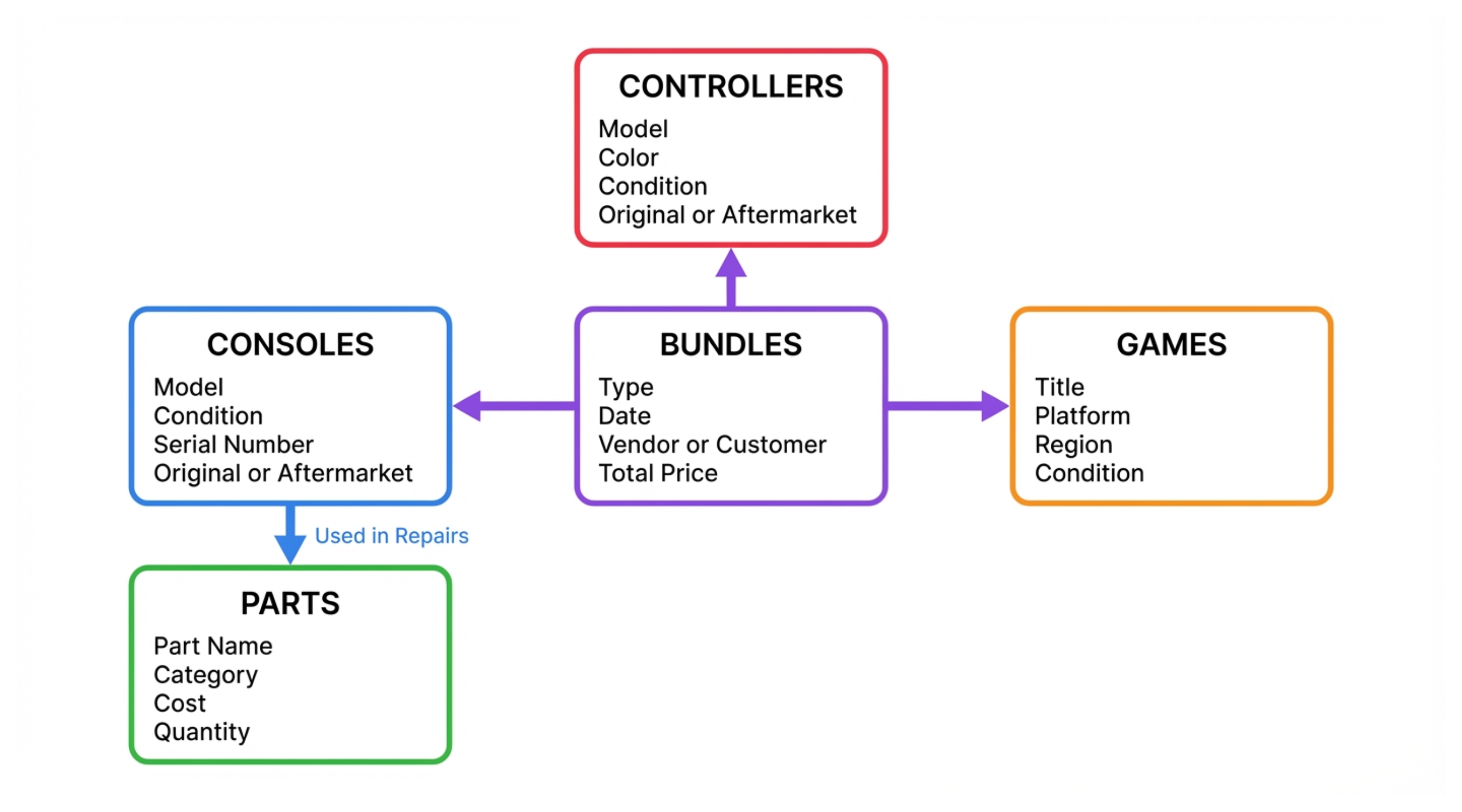
Create a table dedicated to consoles. Track the model, condition, serial number, and whether the unit is original or aftermarket.
Include linked fields for any accessories or controllers the console needs, so you always know what is required for that particular console.
Controllers Table
Create a table for controllers, with each controller as its own record. Include fields for model, color, condition, and whether it is original or aftermarket. This captures all the important details for tracking and refurbishing controllers.
Games Table
Games should also have their own table. Games are standalone items and do not require accessories to be tracked. Include fields such as title, platform, region, and general condition.
Parts Table
Parts are essential for refurbishment, including power supplies, AV cables, replacement sticks, fans, shells, and other small components.
Mixing parts into your main tables creates clutter, so create a dedicated Parts table for everything used in repairs and assembly.
Include fields for part name, category, cost, and quantity in stock. You can also add a linked field to connect each part to the console or controller where it is used.
This setup gives precise traceability. When you repair a console, you link the parts used, and Airtable automatically adjusts your stock.
Handling Bundles for Purchasing and Selling
Bundles are the heart of your system, because your buying and selling almost always involve mixed groups of items.
Airtable becomes very powerful when you treat each bundle as a single record. This record collects everything that belongs to that purchase or sale.
Create a Bundles table that includes the bundle type, the date, the supplier or customer, and the total price.
Most importantly, add linked fields that connect consoles, controllers, and games into this bundle. These links allow you to track every item that was purchased or sold together.
This solves your biggest problem. It gives you a clear history of what arrived together and what left together.
Example Workflow From Start to Finish
Imagine you buy a lot that includes 2 consoles, 5 controllers, and 4 games.
The first step is to create a purchase bundle. In this record, you fill in the vendor name, the purchase date, and the total price of the bundle. Then you link the items you bought from the appropriate tables:
-
For consoles, link the records from the Consoles table. If a console doesn’t exist yet, create a new record with all its details and then link it.
-
Do the same for controllers and games, linking existing records or creating new ones as needed.
Once the items are in Airtable, you can assemble products. For example, to build Console A, link a controller, a power supply, and an AV cable to it. This way, the console record now shows all the parts and accessories that make it sellable.
When a customer buys something, you create a sale bundle. For instance, a customer might buy Console A, Game X, and an extra controller. Create a new bundle record, set its type to “sale,” and link all the items in that purchase.
By doing this, each item’s status updates automatically, and you can track the total cost versus the sale price. This lets you calculate profits, monitor inventory, and see exactly which items were sold together.
Following this workflow keeps everything simple and easy to manage from purchase to sale.