Best Practices for Sharing Complex Airtable Bases Securely
As an Airtable base grows, I become much more careful about who gets direct access to it. A complex base can have linked records across several tables, automations running important workflows, and fields that only certain people should see.
Giving everyone Editor access usually isn't necessary. I prefer giving each person access to only the part of Airtable they actually need.
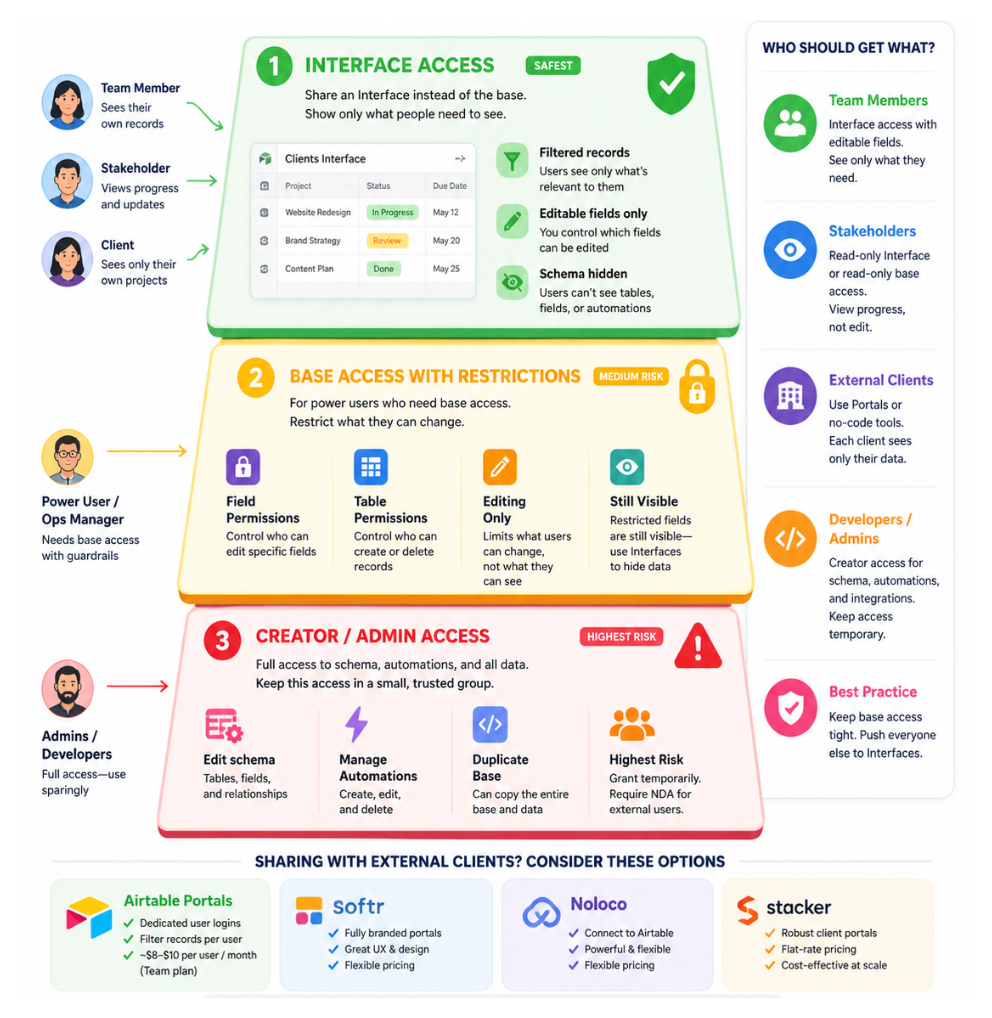
1. Default to Interface Access, Not Base Access
For most people, I would start with an Interface instead of sharing the entire base.
An Interface lets you decide which records and fields someone can see and what they can edit, without giving an Interface-only collaborator access to the underlying base structure, fields, or automations.
This works well for team members updating records, managers approving work, or stakeholders who only need to see a particular part of the base.
Just remember that the person needs to be an Interface-only collaborator for this separation to work. If they already have access to the base, they can still open it based on their existing permissions.
To share an Interface without sharing the base, open the Interface editor, click Share, and invite the person from there.
Interface-only sharing is available on paid Airtable plans and requires the collaborator to have an Airtable account.
For more options, including Portals and external tools, see 6 Ways to Share Airtable Interfaces with Clients.
2. Show Each Person Only Their Records
You can take Interface access a step further by filtering records based on the person viewing the Interface.
For example, if I am building a project tracker where each team member should only see their own projects, I can add a User field to the Projects table. In the Interface, I can then filter the page so the logged-in user only sees records where they are selected in that field.
I would use the same approach for a client portal where each client should only see their own projects or requests.
The important thing to remember is that this filter controls what they see in the Interface. If they also have access to the underlying base, their base permissions still apply.
For a more detailed example, see How to Restrict a New Collaborator's Access to Historical Records and Sensitive Fields.
3. Control Which Fields People Can Edit
Someone may need to see a field without being allowed to change it.
For example, a team member can need access to a project budget while only a manager should be able to update it. In the Interface, I can show the Budget field but keep it read-only for that workflow.
I use this for fields such as approval statuses, internal calculations, financial information, and other values that should only be changed through a controlled process.
If someone should not see a sensitive field at all, don't just make it read-only. Leave it out of their Interface and avoid giving them base access where they could still see it.
4. Add Field and Table Permissions When Someone Needs the Base
Sometimes Interface access isn't enough. A developer, operations manager, or power user can genuinely need to work inside the base.
In that case, I would still avoid giving them unrestricted editing access where it isn't necessary.
On Team, Business, and Enterprise Scale plans, Airtable lets you set editing permissions for individual fields and tables. You can control who can edit a particular field and who can create or delete records in a table.
For a field, open its menu and select Edit field permissions. For a table, open the table menu and select Edit table permissions.
These permissions control what someone can change, not what they can see. If visibility is the concern, I would use Interface-only access instead.
For more on this, see How to See and Manage User Permissions in Airtable.
5. Keep Creator Access Limited
I keep Creator access limited to the people who actually need to change the structure of the base.
That usually means the people responsible for fields, tables, automations, Interfaces, and the overall setup. Most people using the system day to day don't need that level of access.
The same applies when bringing in an external Airtable consultant or developer. Give them the access they need while they are working on the project, then remove it when the work is complete if they no longer need it.
For larger changes, Business and Enterprise Scale plans also have App Sandbox, which lets you test structural changes away from the production base before applying them.
I cover that workflow in How to Safely Make Changes in Airtable Without Breaking Production.
6. Use Portals for External Clients
External clients are a different situation. I usually don't want to add every client as a collaborator on the main base.
Airtable Portals lets you give external users access to specific Interfaces without giving them access to the underlying base. Portals is available as a paid add-on on Team, Business, and Enterprise Scale plans.
If you need more control over branding or the client experience, tools such as Softr, Noloco, and Stacker are other options.
I compare the different approaches in 6 Ways to Share Airtable Interfaces with Clients.
How I Would Choose
For most internal users, I would start with an Interface and only give direct base access when they genuinely need it.
If someone needs to work inside the base, I would use field and table permissions to limit what they can change. Creator access would stay with the small group responsible for maintaining the system.
For external clients, I would look at Airtable Portals or a dedicated portal tool instead of opening up the main base.
The goal isn't to add as many permission rules as possible. It is to give each person the simplest level of access that lets them do their job without exposing the rest of the base.