How to Automatically Email Upcoming Project Deadlines in Airtable
Missing a deadline is expensive. A daily automation that scans for upcoming deadlines and emails the right people removes the need to manually check a calendar or send reminders by hand.
Here is the complete setup.
The Table Setup
Your projects table needs these fields:
- Project Name (single line text)
- Deadline (date)
- Assigned To (email or linked record with an email field)
- Status (single select) you will use this to exclude completed projects
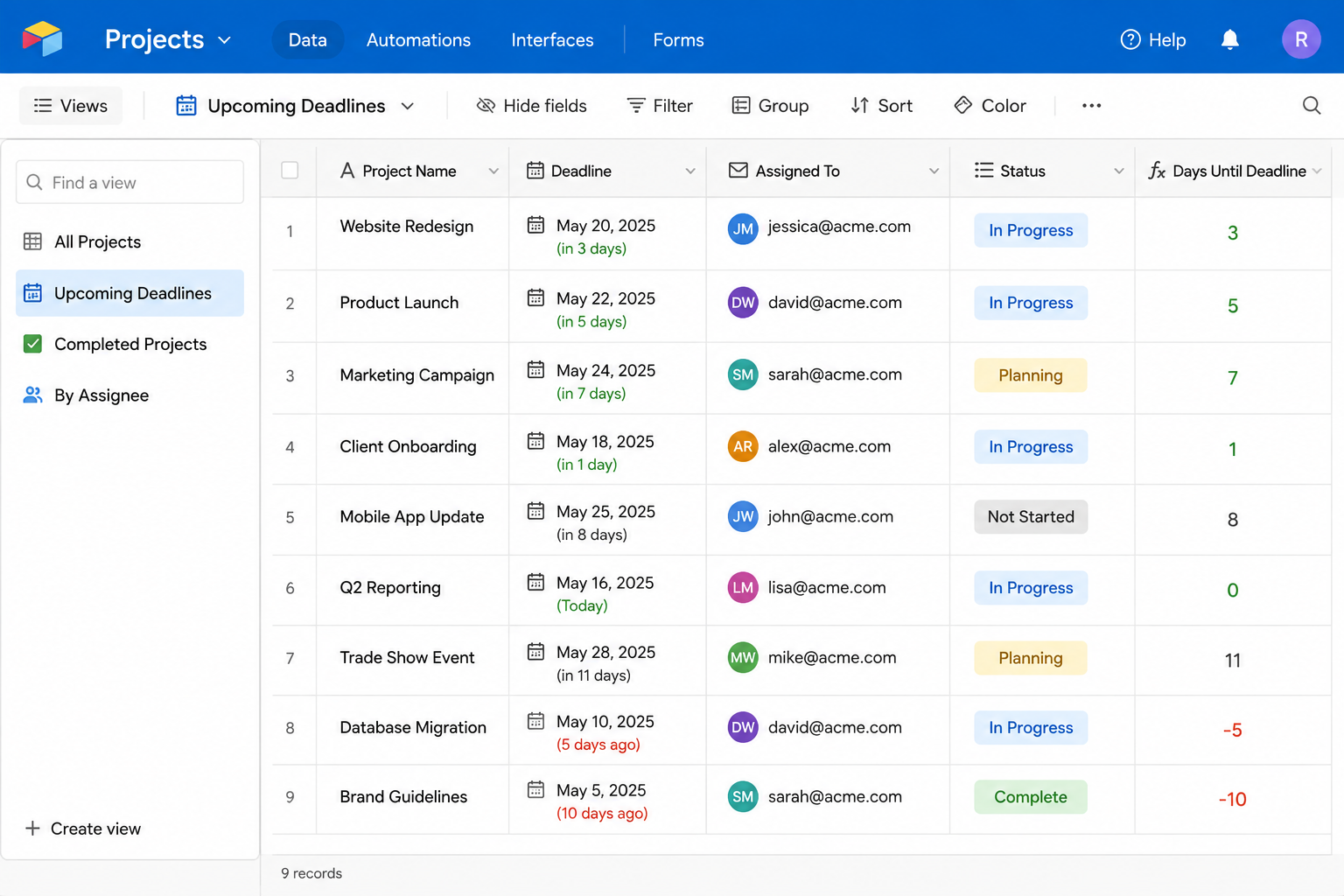
You also need a way to know how close each deadline is, so the automation can compare it against a threshold every time it runs. That's what the formula field below is for. Add:
- Days Until Deadline (formula):
DATETIME_DIFF({Deadline}, TODAY(), 'days')
This calculates how many days remain until the deadline. A positive number means the deadline is in the future. A negative number means it has passed. Zero means today.
The Automation
Create a new automation with these steps.
Trigger: At a scheduled time
Set the trigger to run every day at a fixed time, for example 8:00 AM. This daily check ensures reminders go out consistently without requiring anyone to manually trigger them.
Action 1: Find records
Add a Find records action on your projects table with these conditions:
- Days Until Deadline is less than or equal to 7
- Days Until Deadline is greater than or equal to 0
- Status is not Complete (or whatever your completion status is called)
- Reminder Sent is unchecked (see below)
This finds all active projects due within the next 7 days that haven't already been reminded about. Instead of typing these conditions directly into the Find records step, it's usually easier to build a filtered view on the projects table with the same criteria and point Find records at that view. When you need to tweak the window later, you're adjusting a view you can see and check against your data, rather than settings buried inside the automation.
Action 2: Repeating group
Add a Repeating group to loop through each found record. Inside the repeating group:
Action 3: Send email
Configure the Send email action:
- To: the email address from the Assigned To field (use a lookup if it is a linked record field)
- Subject:
Reminder: [Project Name] is due in [Days Until Deadline] days - Body: use field tokens to include the project name, deadline date, and any other relevant details
Action 4: Update record
Still inside the repeating group, add an Update record action that checks the Reminder Sent field on the record you just emailed.
Without this step, the same project gets emailed again every day it sits inside the 7-day window, since the Find records conditions above would keep matching it. Checking Reminder Sent after the first email, and filtering it out in Find records, means each project gets exactly one reminder rather than one every day until the deadline.
Adjusting the Reminder Window
The 7-day window is a starting point. Adjust the Find records condition, or the view it points to, to match your workflow:
- For a 3-day window:
Days Until Deadline <= 3 - For both a 7-day and a 1-day reminder, one approach is to create two separate automations, one for each threshold, each with its own Reminder Sent style field (for example Reminder 7 Sent and Reminder 1 Sent) so the two don't interfere with each other
Stopping Reminders After Completion
The condition Status is not Complete prevents reminders from going out after a project is marked done. Make sure your team updates the status when they complete a project, otherwise reminders continue past the deadline.
If you also want to send a reminder when a deadline is missed (Days Until Deadline goes negative), add a separate automation or modify the condition to include negative values for overdue projects.
Testing Before You Turn It On
Before enabling the schedule, test the automation on a record you control.
- Duplicate a real project record, or create a test one, and set its Deadline to a few days from today so it falls inside your reminder window.
- Set Assigned To on the test record to your own email address.
- In the automation editor, run the Find records step manually and confirm your test record appears in the results.
- Run the whole automation once manually and check that the email arrives with the correct subject and field values filled in.
- Confirm Reminder Sent gets checked on the test record afterward, then run Find records again and verify the test record no longer appears.
Once all of that behaves as expected, turn on the schedule and delete or archive the test record.
For a more complete email automation sequence that handles replies and follow-ups, see how to send automated follow-up emails in Airtable. For understanding why DATETIME_DIFF sometimes shows unexpected values in date calculations, see why DATETIME_DIFF shows the wrong value.